The only way I could get anything done with Native Access is through SEVERE manual intervention with pretty much every step of the way and it's taken me over a week so far to install what software/plug-ins I have so far, and I still have all of the largest Kontakt instruments left to install.
This is a fresh install of Windows 11 with nothing else but FL Studio and the most recent windows updates installed, and my windows defender fire wall is WIDE open. So its not 3rd party, VPN or Firewall.
For redundancy I have even added Native Access the program, its installer straight from your website, NTKDaemon and the NIHardwareService to my firewall exceptions with BOTH private and public rules.
I have the latest update of visual c++ redistributable installed. I have tried even installing the older versions as directed to by some forums, but I am unable to as per the installer saying that I have the newest version installed and cannot install the older versions.
SFC says file system integrity is perfect.
I ran DSIM and everything was fine.
I did both of these things in Safe mode as well.
I've cleared the TEMP files
I'm running everything including the NA installer and NA itself with administrator privileges.
Controlled folder access is turned off in windows defender and I've even FOOLISHLY turned off Smart App protection without realizing I cant turn it back on, trying to get this installer to do it's job. So now even IF I get it figured out, I'm going to have to reinstall windows AND START ALL OVER AGAIN n order to turn Smart App Protection back on because I didn't realize it's irreversible.
I've changed the download folder to "C:\NI Instruments\Downloads", and the content folder to "C:\NI Instruments" directly off the C drive, so that OneDrive isnt interfering with it at all.
Even when I managed to download the installers for the software that comes with NI360 (like Vinyl and RX 11), I had to run them in safe mode in order for them to install because they wouldnt run otherwise, and kept throwing me random (or blank) error windows. I did this by restarting and retrying the downloads over and over again until they finally completed, then to avoid the errors, I manually copied those installers out of the Downloads folder onto the desktop, restarted my computer into safe mode and manually installed each plug-in individually.
Fine. Progress, right?
Now that I'm done that, I have to install the instruments for Kontakt, but they dont have installers. They write directly to the Content folder. The only thing is, those downloads keep failing over and over just like the installers did. As I said, I've done every troubleshooting step I could dig up from every support forum I could find.
Yes, I am downloading the instruments one at a time. Yes I have cleared the temp folder in Local App Data. Yes my firewall is off. No I do not have 3rd party antivirus or a VPN, but i even set up exceptions for Native Access, its installer, NTK daemon, and NIHardwareService for both public and private networks on windows firewall. I have tried restarting the NTKDaemon in services, I have tried installing older versions of the Daemon and they've failed, then uninstalled NTKDaemon, Native Access and started fresh again about 6 times. I have tried this in safemode too, but at the 'Installing Dependancies' step of the Native Access loading screen (when it first starts) keeps looping me into re-downloading just the NTKDaemon, saying it's not the right version, and failing to launch altogether. So i leave safe mode.
I HAVE made a little progress though..
I have found that the only way I can push these content downloads through, is by continually going to the Content folders' properties and de-selecting read-only in the folder attributes over and over again until each download finishes, because it keeps resetting the folder back to read only.
I've tried giving my user account full permissions on the folder through both the security panel and command prompt, and succeeded, but the Content folder I have set in Native Access will not stop setting itself to read only justmoments after I apply write priviledges to the download folder and everything inside of it. And yes, I had the same issue with the default Content folder Native Access came set with (C:\Users\Public Documents). So I changed it to a folder just off the C Drive so it wasnt a shared folder, and wouldnt be effected by OneDrive, thinking it would help. It did not.
This is how I know it's not a network issue though, because as long as I keep turning off the read-only attribute, over and over on the folder the Native Access is trying to write the instruments to (Content Folder), it downloads uninterupted as long as I continuously set read-only attributes to off.
This has required that I painstakingly sit here while the entire 1TB+ library of Kontakt instruments installs, with me de-selecting Read Only in the folders properties over and over. This process has just today thrown me a BSOD while NA was trying to download an instrument, presumably because of all the screwing around that's going while it is trying to write to the drive.
On top of that..
Now that I only have 34 of the largest instruments remaining out of the 200+, Native Access just threw THIS error at me. [REFER TO SCREENSHOT BELOW, AS I AM TOO NEW TO POST LINKS] This is a new one.
I am beyond my wits end here with this. It's not the first time I've had to wrangle Native Access into giving me what it's supposed to give me. I am ready to cancel my subscripton after a year of giving NI my money. I am losing my MIND here trying to figure this out. I have been sitting at my computer for hours on end, every day for the last week trying to install my NI360 subscription.
And to top it all off Native Instruments CustomerbSupport takes almost 2 weeks to get back to me through their e-mail comms, so by the time I get any correspondence from them, it's halfway through my $66 monthly subscription!!! This is the worst experience I've ever had trying to install some software that I PAY FOR.
PUHLEASE help me. I use my music software for clinical Music Therapy, and without it, I am suffering. Let alone the amount of struggling I am going through trying to get this Native Access installer to do what it's supposed to do.
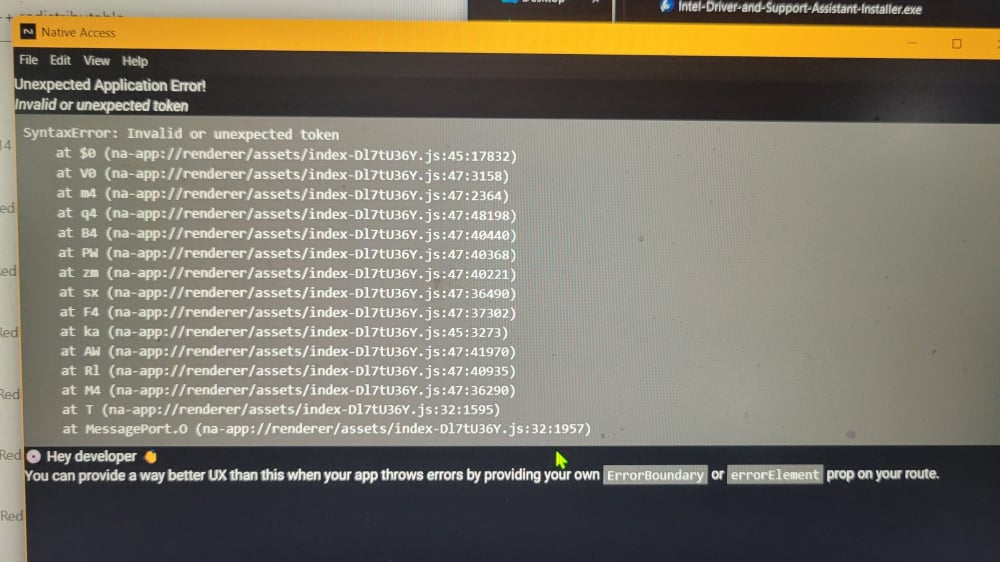
I have attached a screenshot of the error i mentioned above, in case the link fails. I have been attempting to install these dependancies for the last week now with varying, but mostly very little success, but this is the first time I've seen this new error

