Download Failed
Try clearing failed downloads
Then reboot computer
then do not update the products ,
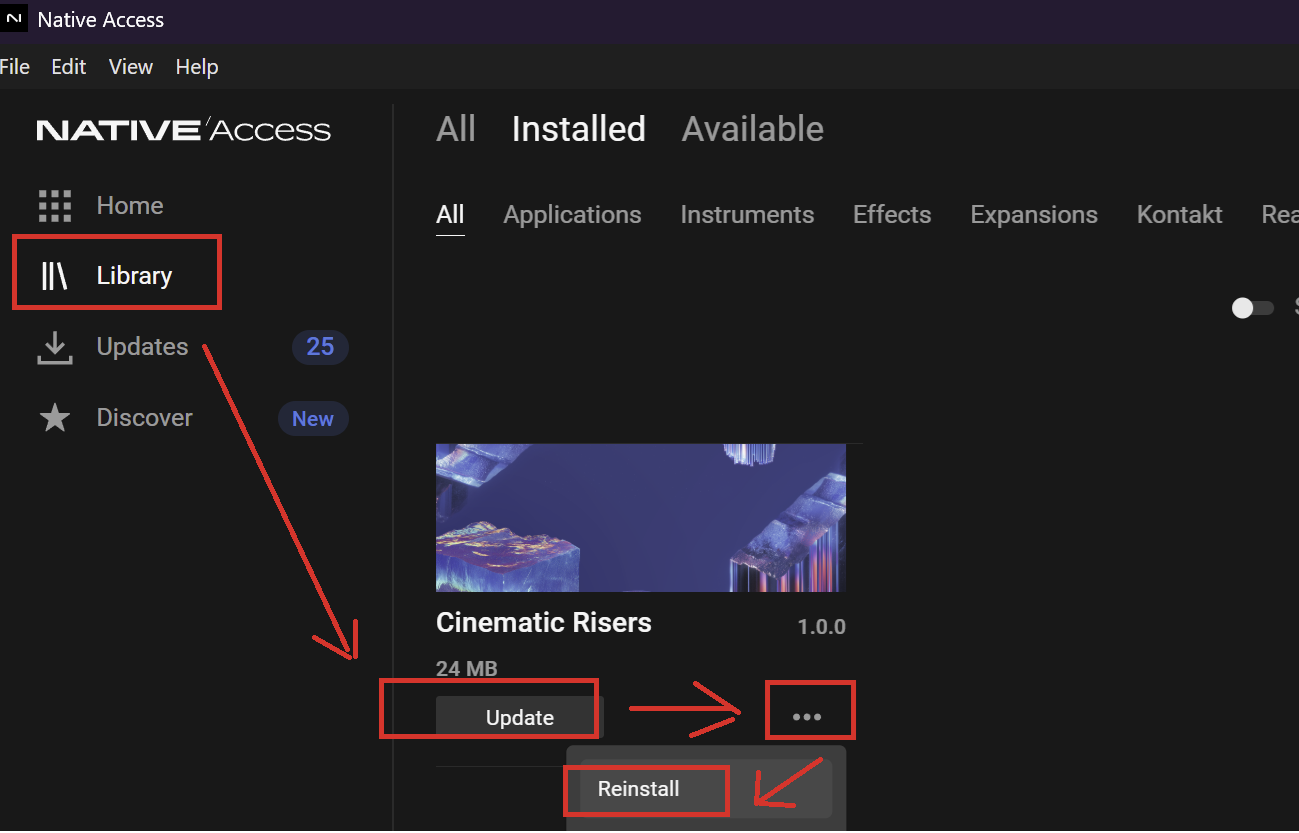
instead go to tab Library and in lower right of product that has update click three little dots and then select Re-install.
.
Procedure should work and should also clear the available update for the product. Due to Native Access reacting with a delay then it might take moment for the update to clear.
I have same problem and procedure works for me.
Re-installing NI Access and the NTKDaemon as per NI's suggestions did not work for me.
This methode did however, long and tedious it may be for 17 updates ….. but it was successful. Many thanks !!!
But we should not have to use such a work around………
J
@Jeremy_NI , perhaps you should check this problem. For some people , myself included , then a lot of updates has refused to download. From what has been reported then the issue could either be regional or occurring at only some times….
The fix for the download issue has been to re-install the product rather than doing the update offered…
Hey @Zigzic @Joakes @PoorFellow We've seen an issue with the installation of the Massive X Factory Library, this might be related, thanks everyone for the report, and also @Vocalpoint who reported it earlier. Forwarding this to the team.
In the meantime please get in touch with our support. Please include the support file you created from Native Access: https://support.native-instruments.com/hc/en-us/requests/new
It doesn't work
I uninstalled it using your little program and reinstalled it; it worked, but 21 updates is a long time. It's not the first time there have been problems with updates. It would be nice if you paid more attention to them ;-) Thanks
You were supposed to clear all the broken update downloads , reboot and then re-install rather than update - but perhaps you could not clear the broken downloads (?)
I uninstalled it using your little program and reinstalled it; it worked, but 21 updates is a long time.
Great that you found a way of making it work 🙂
NI's product quality has been circling the drain for quite a while and this "download failed" fiasco is the latest proof of this. Your solution got me past the "download failed" issue. But one important thing to note..and it may be the actual root cause of the "download failed" problem altogether… it looks like NI changed the library directory names from, for example, "Carbon Decay" to "Carbon Decay Library". Re-installing leaves the "old" directory behind… so you end up with two directories for each library after this process. Massive (and other NI tools??) are still using the old directory - even after the "update". This is proven by moving the "old" directory somewhere else. When you do that, the expansion disappears until you move the "old" directory back. You can however manually load Massive presets from the "new" directory - if you know where they are - they just don't show in the Massive DB/browser. FWIW I am using Massive 1.7.0 for my testing.Dear NI: This is a serious bug.
it looks like NI changed the library directory names from, for example, "Carbon Decay" to "Carbon Decay Library". Re-installing leaves the "old" directory behind… so you end up with two directories for each library after this process. Massive (and other NI tools??) are still using the old directory - even after the "update". This is proven by moving the "old" directory somewhere else. When you do that, the expansion disappears until you move the "old" directory back. You can however manually load Massive presets from the "new" directory - if you know where they are - they just don't show in the Massive DB/browser. FWIW I am using Massive 1.7.0 for my testing.Dear NI: This is a serious bug.
it looks like NI changed the library directory names from, for example, "Carbon Decay" to "Carbon Decay Library". Re-installing leaves the "old" directory behind… so you end up with two directories for each library after this process. Massive (and other NI tools??) are still using the old directory - even after the "update". This is proven by moving the "old" directory somewhere else. When you do that, the expansion disappears until you move the "old" directory back. You can however manually load Massive presets from the "new" directory - if you know where they are - they just don't show in the Massive DB/browser. FWIW I am using Massive 1.7.0 for my testing.
Dear NI: This is a serious bug.
@Jeremy_NI , this report appear to be correct .
I also have dupe directories (and disk space waste) after using reinstall as a solution to the download failed… (Ref. AK5280 post above)
@Vocalpoint , you might find the above of interest if you did not notice already.
Thanks for the report, forwarding this to the Native Access team.
The thing with duplicate folders might be a consequence of the workarond, meaning installing from scratch in a new folder instead of updating the existing folder, not the cause of the issue.
Regarding Massive, still looking in the old location, can you try the following:
In the Windows File Explorer, go to the following location:C: > Users > "Your Username" > AppData > Local > Native Instruments Note: The "AppData" is a hidden Windows folder. See this article for instructions to display hidden Windows folders.
Search through the Native Instruments folder at this location to find the Massive folder. Delete the Massive folder Reopen Massive in standalone.
Thanks so much for the reply. I actually did try cleaning the %appdata%\…\massive directory as you suggested and as I had read about on other forum posts, etc. I followed all the steps you suggested, too. The problem continues. Note that I later discovered that I can actually load the Massive presets manually… so they are there if you use the File|Open menu to point to the .nmsv files in the "new" directories. The Massive browser and database just don't find stuff in those "XXX Library" directories. This may be a Massive 1.7.0 bug. I haven't tried Absynth 5 yet. Battery 4 seemed to find the new directories ok though. (the kits from a "new" directory" do appear in the Battery kit selection browser). The "new" directory names are persistent - always. Interesting that the NI Access says "Download Failed" when you try to update an expansion lib when downloading does not appear to be the actual problem. So maybe a bug in NI Access?
Thanks again for the reply/attention to this.
There is definitely a bug in Native Access for some product updates not working, it's being investigated and you can follow up HERE. We'll also have to look in that issue with Massive, thanks again for reporting.
Thanks. But.. it seems the issue being reported at the link you provided is mostly about Massive-X. I want to be sure that NI is aware that the issue reported here is about (the majority of) expansion updates (a few did update as expected, but most do not) and specifically Massive, Battery, Absynth5, etc. And the issue at that link doesn't seem to mention the "new" library directory names. That could help more quickly narrow down the source of the bug.
Thanks again!