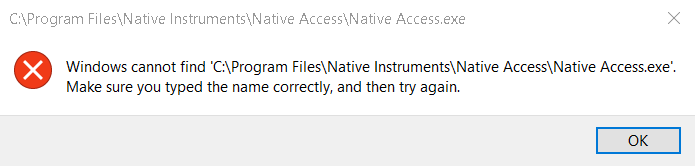
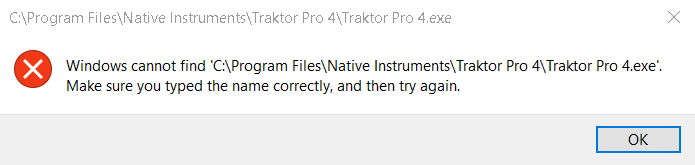
Both Traktor Pro and Native Access started acting weird, giving error messages of not finding files, even though they are clearly there. Anyone out there who can educate me on whats happening, or a solution?
Have tried downloading again native access and installing again, without luck. And surely I cant download Traktor Pro again since Native Access wont work 🤷♂️
You need to specify that file needs to be open with Administrator rights.
DunedinDragon, tried that.. same happens. I tried to Reset Premission.. same happens. I tried Take Ownership.. same happens.
giving error messages of not finding files, even though they are clearly there
Does the same thing happen if you go to the folder containing the actual .exe file ,
then right click file and select run as an Administrator ?
E.g. run Traktor Pro 4 from C:\Program Files\Native Instruments\Traktor Pro 4
and
E.g. run Native Access from C:\Program Files\Native Instruments\Native Access
.
Else then check computer for virus and malware and be sure that you have neither…
Then try turning off you AV completely to see if that will let you run the files…
Also then try uninstalling both Native Access and the NTK Daemon ,
and remove the NativeAccess folder from %AppData%\Native Instruments\
then reboot
then download and install as an Admin latest version of Native Access for your OS
Tried everything PoorFellow mentioned without luck. Am starting to think those are registry issues..
Maybe time to create a new user/account on your Windows machine.
When was the last time this actually worked correctly? Since you say "started acting strange" - it appears this was good and then suddenly was not.
The only time I have ever seen this error is when the actual install of NA is so botched that the icons do not even work.
And the registry is not part of this equation - unless you went in there and started messing around.
I think some critical information about this machine OR what you have done to this install is missing. (Permissions come to mind)
In every install I have ever done for NA - it is install, open and use. And - never run in Admin mode either.
VP
Vocalpoint, the fact is as I said, the programmed worked fine days ago, and when opened the 19th it began acting this way, nothing has been done.. except when I think about it a Windows Update. Agree that the install might be botched.
If these are only registry issues then they should be fixable with my above suggestion uninstalling - reinstalling N.A.
Also , if Windows says that it can not find a file if/when you run the same file directly from directory installed in then I seriously doubt that it is a simple installation issue.. And if you tried same with the AV turned off and it still report that it can not find the same file that you are opening then that only adds to it… It sounds as if there is something wrong somewhere.
Maybe you should start with going through some of the more fundamental checking steps to make sure that your installation is not somehow corrupted ?
Use the System File Checker tool to repair missing or corrupted system files
How To Use DISM To Repair Windows Image (Please backup personal files as suggested before proceeding)
Allow an app to access controlled folders
block third-party app installations in Windows 11/10(for how to unblock)
Well - if you believe it's a Windows update - the first question I have is - is your machine enrolled in the Windows 10 ESU program?
If it is - you get updates. Which should have occurred last Tuesday or Wednesday unless you are doing something specific to delay them.
If you are not enrolled in ESU - Windows 10 is now officially retired - and you get no updates at all.
The 19th was yesterday. So this just started yesterday?
And what exactly are you clicking on - to get this message to appear? Also - Windows 10 Home is VERY restricted - anything else you can tell us about your install?
AND - as Poorfellow notes - these types of issues are usually easily solved by an uninstall/reinstall of Native Access
Vocalpoint, am not here to repeat myself. Have stated already what was and was not done. Regarding the Windows Update..
Fair enough. However KB5072653 is not a critical update. Nor is it a Patch Tuesday security update either.
KB5072653: Extended Security Updates (ESU) Licensing Preparation Package for Windows 10 - Microsoft Support
Very doubtful that this update has anything to do with your issues.
If you do not wish to supply any more info - unfortunately the forum is not really the place for technical deep dives.
Might be better for you to log a ticket with Ni Support and have them get into this for you.
"very doubtful that this update has anything to do with your issues" - agreed
I would have thought that, if a Windows update caused the issue, it would affect the running of ALL exe files on your system, rather than just Native Instruments ones.
Exactly.
This behavior, is almost always caused by a corruption in the shared database file (XML) that Native Instruments uses to map your files, or, by a sudden change in operating system permissions (common after an OS update).
Since both apps are affected, the issue likely lies with the central management system (Native Access) rather than Traktor itself. Here is how to fix this.
Native Access relies on a specific .xml file to know where everything is. If this file gets corrupted (which can happen during an update or crash), it "forgets" file locations. Deleting it, forces Native Access to scan and rebuild a fresh, correct map.
.xml
Do this:
C:\Program Files\Common Files\Native Instruments\Service Center\
NativeAccess.xml
Native Access use a background service called NTKDaemon. If this service loses "Full Disk Access" or "Administrator" rights, it cannot "see" the files on your hard drive, even if you can.
NTKDaemon
Try this: Right-click the Native Access shortcut and select Run as Administrator. If this fixes it, you can set it to always run as admin in the Properties menu.
The third case is, as mentioned in another comment, that you are infected by some virus.
_________________________________________________________
However, you didn't respond to a very serious question by PoorFellow, and we need to know that, before anything else:
Are you able to start the applications if you click their .exe (NOT the desktop or start menu shortcuts!) directly from their folder in your hard disc?