Like the stomp boxes that record until you step on a switch then it plays back. Was looking for one that has auto stops on the next beat. Any suggestion on making one if there aren't any in the UL. Didn't see any…
Hello,
https://www.native-instruments.com/de/reaktor-community/reaktor-user-library/entry/show/6525
something like that?
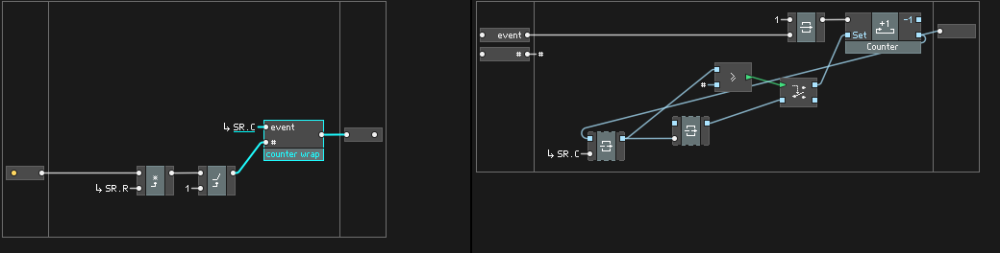
I would do something like this to set the read/write position. It should work assuming a max loop length of 8 seconds at a 48khz sample rate (you can adjust the X length to max # of seconds * samplerate if you need more time)
If you want to reset the loop length on the fly with the press of a button you would just need to feed the desired # of samples into the # input of the first core macro - assuming it's under the thresholds colB posted, it should probably work to feed it back the current output value (& assuming you have some kind of triggering event to latch it with so it's not stuck in a constant 1 sample reset loop)
if this makes sense, you use and adjust the RY and WY inputs to set the # of overdub loops - just keep in mind the tables always use 0 for the minimum value, so 2 total layers will = layers 0 & 1, and so on
Thanks, I'll check it out. Sometimes you just wanna have fun. This one appears to have several drum patterns that overlap and hopefully an audio looper.
It's definitely possible to do this with audio tables (or core arrays) in Reaktor, you'd just have to be careful and deliberate about the ordering. I tried to get one working with an 'undo' feature for the most recent layer but got caught in a loop somewhere along the way - it might just be easier to just use multiple arrays in Core if you can be bothered to set that up
how long of a loop length do you need? what do you mean by "auto stops on the next beat"?
building a basic looper should be pretty easy, good project for an afternoon or something
I don't know, probably less that a minute. I can't remember anything longer than that. lol I see the audio table was mentioned for that. I guess what I meant about rounding to the next beat is like stopping the loop on the nearest whole note. That way it'll loop at the end of one measure then start over on beat 1. Staying in time with itself. Like 12 measures then repeats until I get tired of it. lol I have a midi foot switch to start and stop it. I think it would be fun if it would automatically start playing back and also start a new loop that would record along with the one playing. So every time you step on the floor switch it hold the last loop then starts a new one. Maybe have metronome running the whole time.
I see, maybe the core array length can be predefined before you start to like 12 bars or something. Then each new loop would also be the same length. Can you set the length with a panel dial? I've only made a sampled click sound into a single core array and had to define the array size. Never worked with the tables.
I would just set the array size as large as possible and have the knob set the wrap around to the desired loop length
So to do that you'd have to convert the # of bars to # of samples based on the project BPM and sample rate, and probably use additional arrays for each consecutive loop layer (unless you use a table in Primary, then you can just add on to the Y axis for each layer).
Audio table limits to 999999, so ~20.8 seconds at 48kHz
Core Array limits to 1048576, so 21.8 seconds at 48kHz
It's easy enough to page between multiple core arrays for longer recordings
Array paging is a massive problem for something like a live granular processor, where it kills the cpu because the inner loop must handle multiple arrays. It should be fine for something like a looper though.
Interestingly, Snap Value Array limits to 10000000, so should handle up to ~208 seconds at 48kHz. And it has the handy side effect of automatically storing the loop(s) data in a snapshot. Never tried this, so not sure if it's bug free with such large data blocks, also no idea how cpu efficient it would be, pushing it at audio rate. worth testing though. Might find that huge snapshots like this don't play well with Rack ready Blocks in some DAWs, due to limits on 'host chunk' size that are DAW dependent, but it might be fine otherwise.
ooh never thought to try encoding audio information into an SVA bank, nice catch! will definitely give that a shot.
Can you post a starting ensemble with an audio table. This is all new to me. Just something basic with the table and a start stop button. I guess there would have to be another button to choose whether to play or record. Maybe a dial to set the length of the record/play. Sounds like array buffer size is something you can only set in the array parameters and not with a panel dial. I'd appreciate it.
Ok, I'll take a look and see if I can make so sense out of it. Thanks for that, it's a big help just getting started on the right foot. I usually get on the right track only to find out I'm on the wrong train. lol
I'll probably never use it in a daw anyway. Just wanted something to practice with. Thanks for the pointers. I'll look over what Silver did and study the manuals. Imagine a stereo loop is possible if you can address two tables.
Thanks guys for making this so easy. I already have 3 stereo tracks going. Working on arming the record button so it starts recording when the ramp counter resets then stops when the counter finishes. Nice little practice thing. I hooked it up the back end of my amp simulator that also has a metronome. Not sure how I'm gonna do that yet, need some kind of logic that turns off the record button. Maybe just us an IC send from the ramp reset or something.
Here's a little looper that only kicks into record mode when the counter resets to 0. You have to turn on the enable first then when the counter resets to 0 it kicks into record mode then stays in record mode until you turn off the enable at which point it will stop when the counter resets. You can start the counter with the space bar or start in a daw. I play a bit then when I'm ready to record I press the enable button, when I'm done I turn on the enable and it stops when the counter resets. You can also start recording immediately with the record button and it stays on until you turn the enable on and it the counter resets. I haven't mapped the enable button yet but that should work. I haven't thought about it too much, I think the counter resets exactly when it should. There's a z-1 fbk in there that tells it to reset on the next clock.