Now that Maschine is VST3, what are the differences vs VST2?
Performance might be a bit better but I haven't had the time to test it.
A plus for me personally is I can now disable VST2's on my DAW since all plugins I own have VST3 versions, MAS and KK are the last ones in the party, this means a few gig's of VST2's are going to the bin and browsing in DAW is less cluttered.
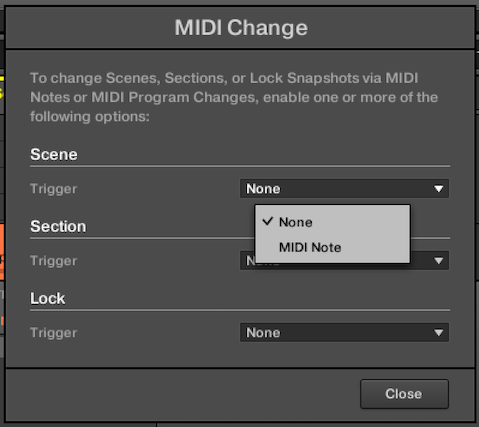
Other than that the only thing I can think of is the VST3 version does not support MIDI Change via Program Change, only MIDI Notes. (@Matt_NI perhaps this should be added to the "removed" release notes / update thread op?? Someone must have forgot); feels a bit like a downgrade but I guess most people won't care about this.
MIDI Change
VST2:
VST3:
That’s interesting!
Then I didn’t know that because none of the plugins we use seem to use the same ID for VST2 and VST3 and show up twice. Have to check with NI's, but I expect the same.
You need to enable this option, for a start
also, disabling Multi Processing will free some CPU resources (i have it enable however, since i find no reason to load 50 vst instruments for a track! 😉)
Interesting. Where do I find these options in Ableton Live or in Komplete Kontrol?
These are options for Cubase. I don't use the DAW's you mention so i don't know, sorry...
Try in their "Options", "Preferences" etc. to find similar commands (if exist)
For sure Ableton must have at least the "Multi Processing" option!
As far as I know multi processing in Live is done one CPU core for each channel. I think there is no such function for disabling VST3 processing in Live. Or am I wrong and does anybody know of it? Or an easy workaround of how to activate it?!
Most DAWs don't have those options, in fact. But again - even if you enable that feature in Cubase, if the plugin doesn't specifically respond to that VST3 feature flag, it will not work!
VST2->3 migration was at the very least implemented for Kontakt, that much I know.