I recently bought an Akai Midimix USB powered Midi device and I am trying to Midi map the faders and knobs with Maschine.
How do I activate the Learn mode with the desired functions in the software?
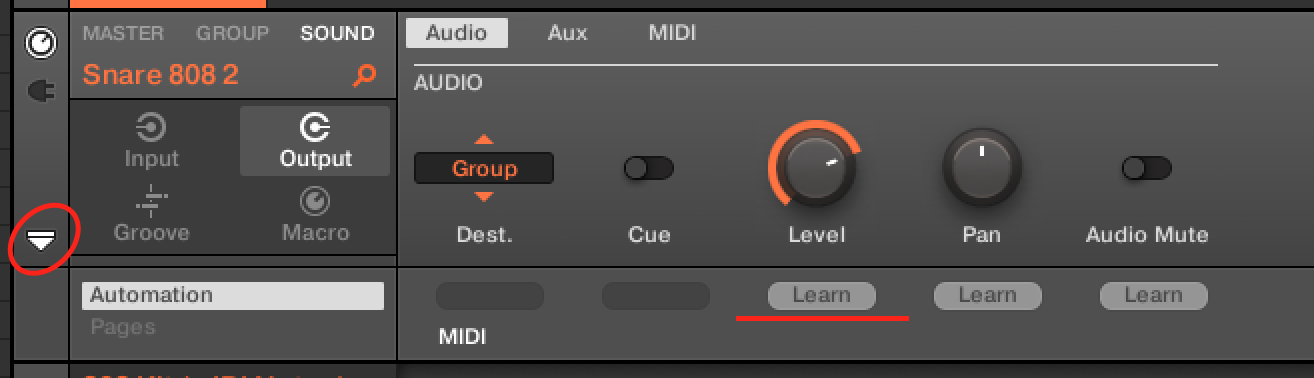
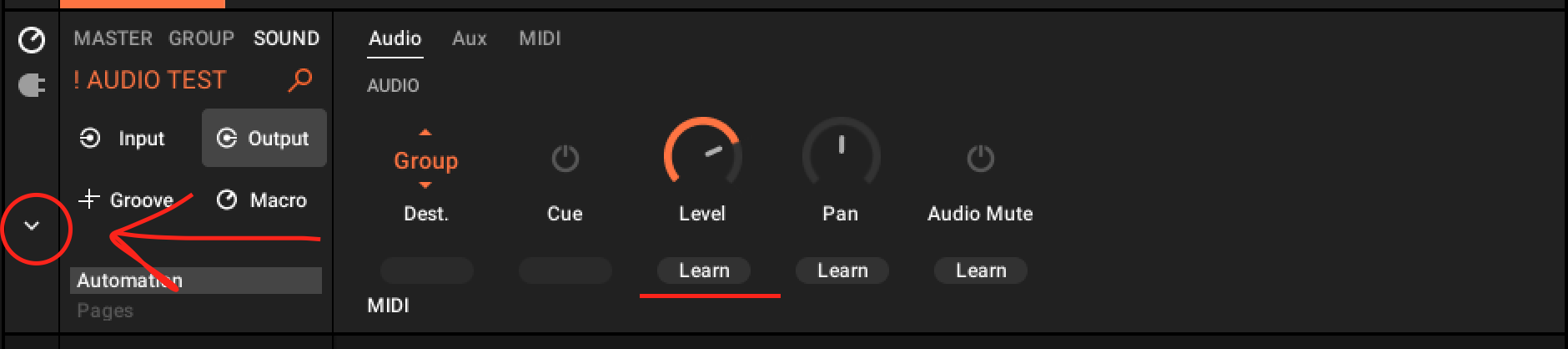
It's exactly the same in V2 and V3. Click the down arrow, and it will open an extra panel with the Learn options.
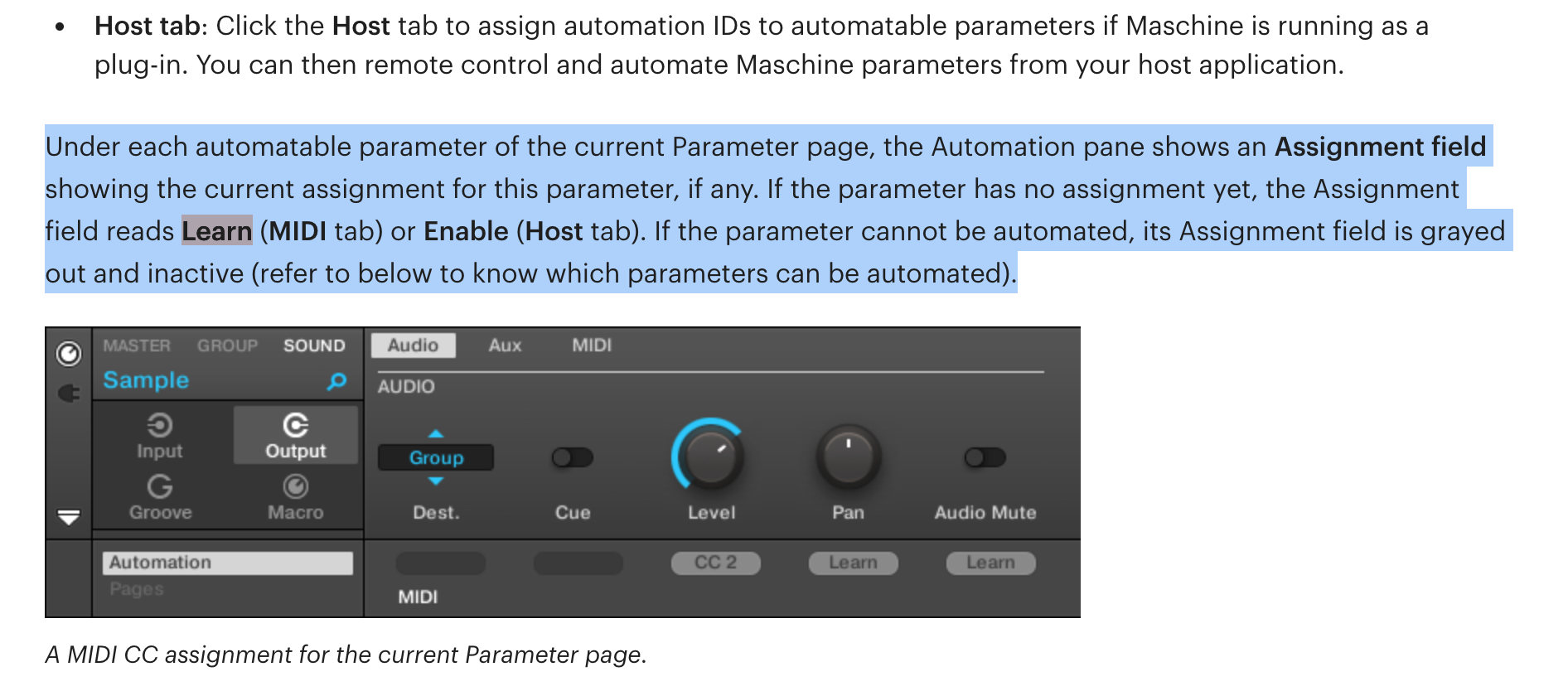
It's here: https://www.native-instruments.com/ni-tech-manuals/maschine-software-manual/en/audio-routing%2C-remote-control%2C-and-macro-controls.html#controlling-parameters-via-midi-and-host-automation
It's not directly under a place called "MIDI Mapping", that term is not even mentioned to show up in a search afaik, this is why I also don't like the approach of just pasting a general link to the manual, the above link puts you directly in the right place tho… Hopefully it helps.
@dmori I feel this platform should be a place where you ask for help if you don't know and are learning and want some guidance. Unfortunately this forum is no longer like this (that's why I don't participate any longer).
@dmori
I feel this platform should be a place where you ask for help if you don't know and are learning and want some guidance. Unfortunately this forum is no longer like this (that's why I don't participate any longer).
Han? In 2 days there are straight answers here… what else do could you want?
At least in the Machine sub-forum there's a few people that give you a straight answer and usually just one that just posts a link to the manual… One person does not represent the whole community. There's about 20 users with 250 + verified thread solutions, non verified could be thousands, and info available for lurkers could help tens of thousands…
Maybe focus on being thankful for those who provide help for free with their free time instead of focusing on the ones who don't provide info the specific way you want it.
@dmori said:Again you mis-read what I'm saying. No point me saying more on this. I guess you don't really understand how Londoners communicate.
@dmori said:
Again you mis-read what I'm saying. No point me saying more on this. I guess you don't really understand how Londoners communicate.
Err… Sorry? was I rude or something? Been in London only once, but had no trouble communicating, maybe I don't understand how you communicate. Not sure how the following could be misinterpreted:
@dmoriI feel this platform should be a place where you ask for help if you don't know and are learning and want some guidance. Unfortunately this forum is no longer like this (that's why I don't participate any longer).
Maybe it was sarcasm or something? 🤷♂️ Doesent matter, if what i said annoyed you it's fine, I'll just avoid replying to you next time, no hard feelings… Have a great day.
You can find the manual HERE
The problem I've found with Maschine and MIDI mapping in the past is you have to save it (I may be wrong as it's been a long time) as a Project. And you can't open a Project in another project. If you save it as a group it doesn't remember the settings and resets. Personally I don't like it where people say read the manual. It's like the expert user who expect everyone to do it like them. Someone sending you a link to a 487 page manual - to me means they don't really want to help you. And I do find it worse if they actually know, could have easily told you, but chose not to. I feel this platform should be a place where you ask for help if you don't know and are learning and want some guidance. Unfortunately this forum is no longer like this (that's why I don't participate any longer). I use Maschine 2 (not 3) so it might be different in the newer version. To map the knobs - Click on learn under the knob (it will start flashing and say learning) and move the fader/knob on your MIDI device.
I've never tried to MIDI learn in the mixer, so I'm not sure how to do this (or if it's even possible). One alternative could be to use Maschine in another DAW as a plugin. You may be able to midi map inside the DAW.
To midi map the mixer’s volumes you have to do exactly the same thing.
You can’t midi map in the mixer, but in the same place as the knobs shown by @dmori you have to go in the GROUP tab and there you will find a LEVEL knob you can midi learn. That’s the level of that group, which therefore corresponds to the volume of that group on the mixer
Thank you @dmori, I noticed that the learn function is a bit different in Maschine 3. I think in Maschine 2 you could right click and select a menu option. This is no longer the case with Maschine 3
I just can't find a way to activate the Learn mode in Maschine 3
I do find it worse if they actually know, could have easily told you, but chose not to
I believe it's better long term to guide the person in the right direction, to find the answer themselves, rather than just giving them the answer.
"Give a man a fish and you feed him for a day; teach a man to fish and you feed him for a lifetime". This proverb suggests that while a temporary solution is helpful, empowering someone with the skills to solve their own problems is more beneficial in the long run.
Well, I look at the information and the manual does not show how to Midi map an external gear. I also uploaded the manual to ChatGPT and it couldn't find the answer himself….
@D-One Again you mis-read what I'm saying. No point me saying more on this. I guess you don't really understand how Londoners communicate.
Han? In 2 days there are straight answers here… what else do could you want?At least in the Machine sub-forum there's a few people that give you a straight answer and usually just one that just posts a link to the manual… One person does not represent the whole community. There's about 20 users with 250 + verified thread solutions, non verified could be thousands, and info available for lurkers could help tens of thousands… Maybe focus on being thankful for those who provide help for free with their free time instead of focusing on the ones who don't provide info the specific way you want it.
Well, @D-One , your answer was super helpful. I miss that down arrow. Thank you so much for the help! 💂