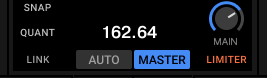
I can't turn off the master clock setting, and all the decks are syncing accordingly to it. It doesn't let me pick another deck for master.
If all decks are off, clock is always tempo master.
You can always select any running deck that is on air (line faders are up, x-fader is open) as tempo master.
If you activate AUTO (on your picture), the first deck running will become tempo master automatically. Can be changed manually, but in this case clock cannot be selected as tempo master.
Edit: to manually select a deck as tempo master, you must press MASTER below the deck header (or MASTER button on your controller.