Download and unzip the NBPL folder: https://drive.google.com/file/d/1s3jqJYjf2nT-bkaZLuI_1jpEWXsOutej/view?usp=drive_link
Place it in: Macintosh HD > Users > Shared
Please download and unzip the installed_products-json file from here: https://drive.google.com/file/d/1SQVknyv8JuDYel8YBhRfTMaFadqIrkhk/view?usp=drive_link
Place the unzipped json file in the following folder:Macintosh HD > Users > Shared > Native Instruments > installed_products
Restart your computer and open Native Access.
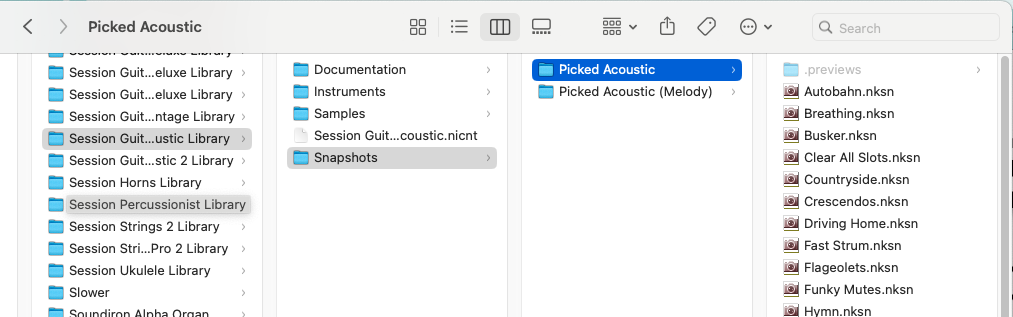
It took me hours to figure this out, but it seems that for MacOS, all "previews" folders within the library folder should be renamed to ".previews". Too bad this post doesn't include this information.
There might be a misunderstanding here. The NPBL, or Preview Library mentioned in this post is a library that needs to be installed separately and contains preview samples of some older libraries. More recent libraries do not need this library because the previews are found in the library folder, which I guess you are refering to.
Not sure what happened on your system but in the case of all the newer libraries, the preview samples are found here and are contained in a folder that is already named .previews and no further action is required for the previews to work in Komplete Kontrol or Kontakt.
The issue is with the app used to extract ZIP files on macOS. The built-in ZIP extraction tool handles files with the ".filename" extension (hidden files on macOS) correctly. However, other apps (such as The Unarchiver, which I'm using) rename them and remove the "." prefix during extraction.
This is great, @Jeremy_NI! Many thanks!
I have all my content on an external SSD, so I just edited the .json file with the pathname for the files on the SSD and it works just fine.
I tried that version and it didn't worked for me
What do you mean by this version? What doesn't work exactly?
I tried to install it as you explain here on that thread and it doesn't work. I tried using Native Access and it failed, I then tried your method (not version), but it didn't work either. I download the files you provided. Moved them to the place you mentioned but unfortunately, it failed. I'm using Tahoe 26.2 and the latest version of the NI plugins. After installing and opening Native Access, I'm left with the option of installing Preview.
Please get in touch with our support then: https://bit.ly/NI_Support_All
If your Native Instruments Library is not in /Macintosh HD/Users/Shared, place the unzipped NBPL into the "Native Instruments" directory where your Native Instruments library is stored.
For instance, the Native Instruments library on an external drive might be located at
/Volumes/YOUR_EXTERNAL_DRIVE/Native Instruments
…where YOUR_EXTERNAL_DRIVE is the name of the external drive containing the Native Instruments library.
THEN, update the unzipped json file, replacing the default path with the path to the NBPL directory, and save it.
After the update in this example, the unzipped json file "Native Browser Preview Library.json" should read:
{"ContentDir":"/Volumes/YOUR_EXTERNAL_DRIVE/Native Instruments/NBPL","ContentVersion":"1.1.0"}
… again, replacing YOUR_EXTERNAL_DRIVE with your external drive name.
Example: I store my Native Instruments library on an external drive called 'T7 4TB'. So, the path to my Native Instruments library on that drive is "/Volumes/T7 4TB/Native Instruments". After I copied the unzipped NBPL directory to that location, I updated the json with the correct value, "/Volumes/T7 4TB/Native Instruments/NBPL". I restarted my Mac, opened Native Access and the problem was solved.
Hi Jeremy. I'm having the same issue with Previews not being installed on macOS Tahoe 26.2. I tried to download the NBPL folder from the link you provided, but I got the following message:
"Sorry, you can't view or download this file at this time.
Too many users have viewed or downloaded this file recently. Please try accessing the file again later. If the file you are trying to access is particularly large or is shared with many people, it may take up to 24 hours to be able to view or download the file. If you still can't access a file after 24 hours, contact your domain administrator."
Is there somewhere else where I can download this file from? I need to start a project so gotta fix this asap. Thank you.
Sorry about that, you just have to wait and try a bit later.
This worked for me, following exactly the process, thank you !
Jeremy NI thank you, it worked for me! A month ago, when this thread was not available yet, I had hard times, looks that this issue is new.. BTW first I downloaded just .json file and forgot to download previews library itself :D
But then read carefully and finally got it.
Thanks once more, I finally can start my learning curve!
Yes this worked for me, using an external SSD. I am installing NI on a new MAC and the previews were throwing errors Tahoe 26.3.1. My NBPL folder is on that volume along with all the libraries. I wanted to avoid downloading all of my Collectors edition libraries. The Previews were giving me problems. I edited the .json file to point to the external volume, forgot to put /VOLUMES/ in the path, dah. After that all is well. I managed to get much of the data sync'd using "Support" - "Add Product Content". I understand why the apps don't fit that method as they are in the /VST3/ folder. How do I do something similar with all my expansion packs? They're on the SSD, but Native Access doesn't know this, showing "Install" buttons. I didn't see any .json files in the /shard/native instruments/installed products/ folder. Thanks -Mark
Now the add product content should also work for expansions. You might need to update the expansions on the old Mac, then you should be able to locate them for the new Mac.