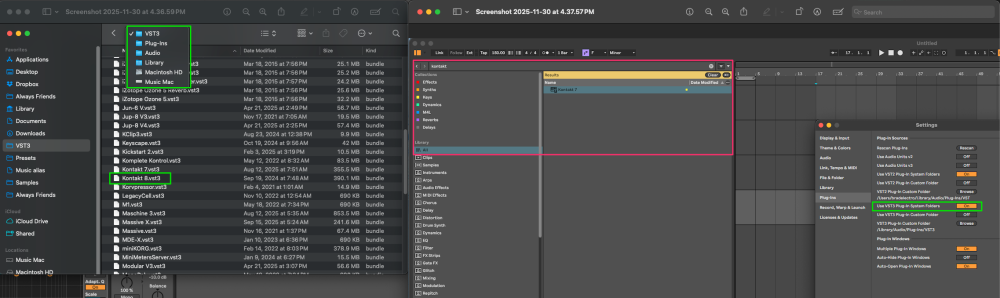
I've reinstalled from Native Access and force scanned in Live but no luck. Kontakt 8 VST refuses to show up in Live. Kontakt 7 Player does, but not my Kontakt 8. What gives?
@braaad Ok, and have you tried to force the plug-in scan in Ableton?
Maybe you can try this:
Delete the Kontakt vst3 fil from your VST3 folder: Macintosh HD > Library > Audio > Plug-Ins > VST3
Open Ableton and rescan the plug-ins.
Reinstall Kontakt 8.
Open Kontakt 8 in standalone and close it.
Open Ableton and force a full re-scan.
It's sometimes been seen to help in similar cases to move the plugin out of scan range m then force a new re-scan then put plugin back and then for yet another new re-scan…
.
Thanks that worked, sort of. I literally saw kontakt 8.vst get scanned by Live, but still can't actually find it in the library. Weird… guess I'll be using Kontakt 7 Player.
@Jeremy_NI , this appear to maybe need a Mac expert (?)
@braaad Have you tried to open Kontakt 8 in standalone? If the standalone crashes, it would mean the plug-in in Live would also crash and might be blocked by Ableton. So please check it out. You can also apply these steps: Kontakt Crashes
Then you can force a plug-in scan in Ableton:
Open Ableton Live.
Navigate to
Preferences
(or
Settings
in older versions).
Go to the
Plug-ins
tab.
Hold down the
Alt
(Windows) or
Option
(macOS) key on your keyboard.
Click the
Rescan
button while still holding the
Alt/Option
key.
Hi Jeremy- yes, it opens just fine in standalone.
Yes that worked! Thanks Jeremy.