So I purchased and installed this, against my better judgement and with the secure knowledge that NI will honor their return policy if needed.
I've started with the Absynth6 preset bank. Preset 1(aarctic drift) sounds great. Preset 2 (aardent corrosie) has abrupt 'popping' sounds in standalone, cubase 15, bitwig 5.3.13 and also bitwig 6 beta 7.
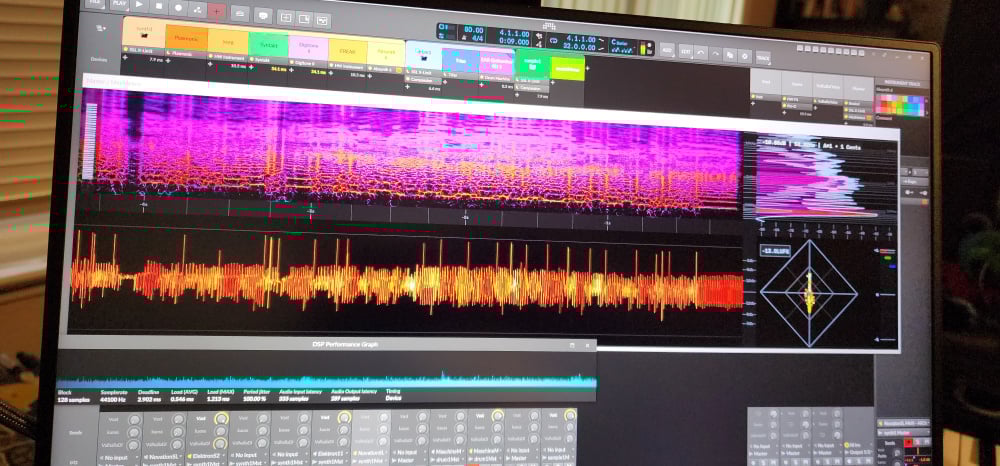
No ASIO/CPU/meter issues, and you can see the meter below. See the hard vertical lines?:
I have tried out 20+ more presets, in the stock order for the Absynth6 bank and I hear no more pops.
In standalone I get identical pops as in the above image, but for some reason I cannot monitor the channel Absynth6 is using in standalone using my meter application. If I set A6 to use "windows audio", I can see meter activity, but if I set it to Focusrite ASIO, I get nothing. My meter is monitoring the main audio outputs and is driver agnostic, so why is this happening?? Anyway this is just one preset. If I find any others doing strange things, Ill post it here.
Edit: Cubase 15 is also making the popping sound on preset #2. Any interface config. ASIO meter does not show peaks or any issues.
@Milkman Could you give us more details on your setup so we can try and reproduce the issue? What soundcard is used, with what settings? Sample rate, buffer size, bit depth, etc..
Win10, cubase 14, 15, BWS 5.3.13, BWS 6 beta 8. Focusrite 18i20, started with 128/44 @ 24 bit. Changed settings from 128 to 512 and everything in between. Changed from 24bit to 32 and back.
This doesnt appear to have anything to do (externally) with audio interface config. The pops are processed by Absynth6's internal effects, and come out effected.
The workaround in my first comment (modifying mono / poly settings or voice settings) does not save, so it always has to be reconfigured on each preset that does it. I've since found that not all presets with pops can be solved by mono/poly alone.
Preset #2 (absynth6 bank), "Aardent Corrosie", which is one of the very worst for making this popping sound. It pops like crazy UNLESS you 1) play one single note at a time, allowing it to tail off. 2) go to the "assign" page and add one more voice. This ruins the sound of the preset, but no more pops.
I have found, for preset #2, if you use the macro knobs to turn "FX Wet" and "FX Dry" completely off, you can hear a small amount of unaffected sound. No pops, no matter how you play it.
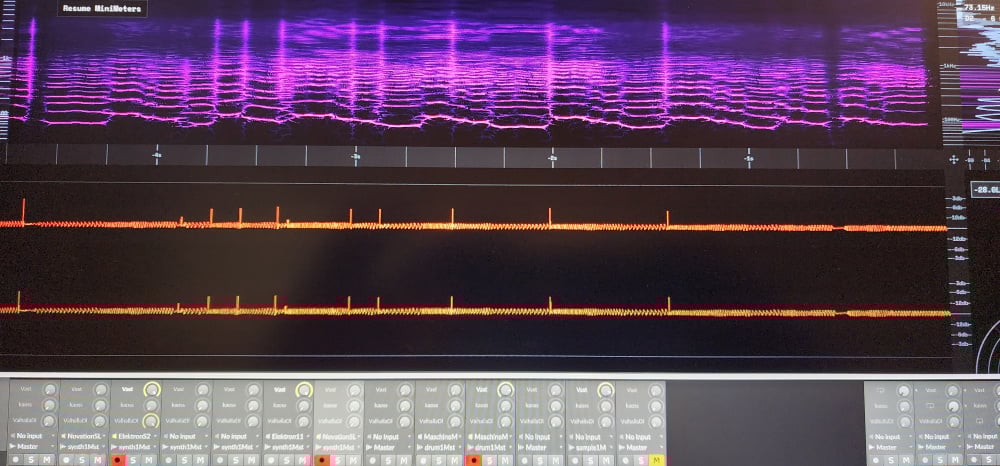
If you start to add back some of the "FX Wet" signal, you can clearly hear the POPS with very little of the unaffected sound, so the pops are very clear. It looks like this on the meter:
Also: The "assign" page remembers the first 1-8 learned or assigned MIDI CCs, but always forgets the other 8. I have to re-bind or learn them for each preset.
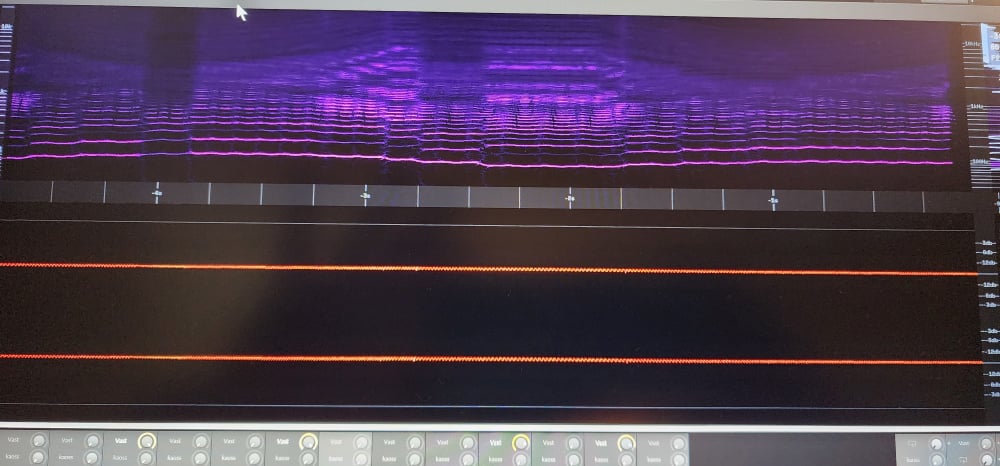
If I turn "FX wet" and "FX dry" completely off, leaving the original signal, the meter looks like this:
The pops come from the FX processors?
@Milkman I forwarded it to the team, they are looking into it, including Brian. I'm forwarding this message from him:
"That's a very intentionally noisy preset actually. When playing high notes there's a click on attack which seems to be intentional, prior to the effect. This is amplified by the effect which is configured in a kind of unusual way. In particular the drive setting in Resonators enhances the noisiness of the attack, as well as the size setting being zero. Lowering Resonators Drive reduces the clicks. This seems to not be such a problem in the bass range. I'd say the sound designer set it up to be a bit chaotic, not sure it isn't intentional. But I'll look a bit deeper"
"We're taking these reports very seriously, if something's broken with the earlier presets I definitely intend to fix it.
You mention other reports in KVR, could you share links here?
Another preset I can point out is "additive piano", preset 8 on bank6. This is a soft, smooth piano sound that I absolutely love, and this sound also generates the same pop. There are others also, and I can point out every one which does this as I come across them.
I can mitigate this by changing M1 or M2 mix mono/poly settings, and the pop sound is infrequent but noticeable. If I set the mid to "poly" for M1 and M2, the pop is gone. The pop is, again, caught up in delay effects on the additive piano patch, so I can tell the pop comes from under the hood. If I go to "assign" and add a voice to the preset, the pop goes away entirely but then the preset is ruined.
https://www.kvraudio.com/forum/viewtopic.php?t=625347
63 pages and counting. I found a couple people earlier in the thread (somewhere around page 40, 50) talking about it, discussing how to modify or remove the pops. (this is a search for the term "pop" in that thread)
https://www.kvraudio.com/forum/search.php?keywords=pops&t=625347&sf=msgonly
This is preset "alien violin" by "Distance".
See the ping on the spectrograph? That makes an audible 'tic' that is processed by internal effects. This happens in standalone or in any DAW, any interface settings.
I should add — the ONLY time I hear these glitch sounds is at the onset of any note. If I sustain a note, this sound does not suddenly occur throughout the sustain, only at the onset.
Thanks for the help, as usual. ; ) Ive been able to fix some of these, so far, in cases where misconfigured presets have caused weird "pops/clicks/blips/pffs", but there are definitely numerous presets which lose their original character when the glitches are fixed. Is this something NI is concerned about, or can I contact Brian C directly for support? Or does the solution need more time? I would love to know. Thanks.
If it helps I have sent one of mine that was popping and sound cutting out to the beta team, happy to pass on any of yours if you want to post them
Thanks. Im manually editing them, where possible, whenever I find them and I've stopped posting about it because I havent heard anything back from NI.
I just noticed that Cubase 15 blacklists Absynth6 VST3. I hadnt run C15 in a few days because I was doing a system rebuild, and when I ran it today it blacklisted A6. Ill try to remove it and see what it does.
I've stopped posting about it because I havent heard anything back from NI.
@Jeremy_NI , This appear to need a follow-up…
As mentioned before, this was forwarded to the team, including Brian. they have been busy with a few other pressing issues.
Of course. I came to patronize Brian Clevinger, not to enjoy NI support.
My holiday wishes were that Rhizomatic would sell Absynth, but this will have to do for now.
Cubase 15, on a fresh install and a default profile, is still blacklisting A6 on windows11. The win11 install is also fresh - when I use new major DAW versions (C15), I rebuild a workstation for it to make sure things are clean.
I havent made a ticket for this. Ive been really busy and occupied.