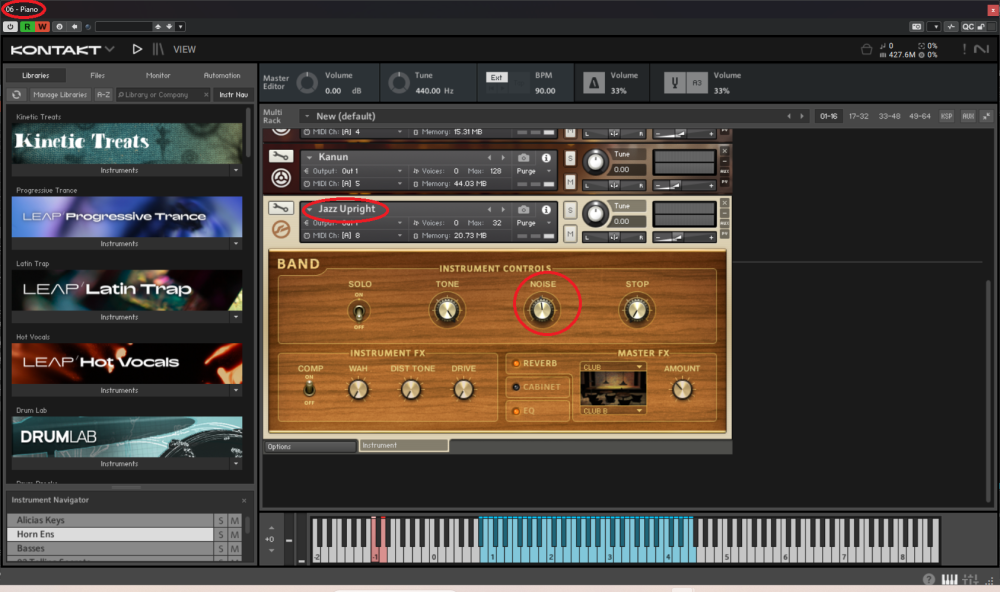
I am trying to automate a parameter of the Jazz Upright, but the Piano is selected as the instrument in the upper left corner, and the automation always applies to the piano. How do I change this to automate the Jazz Upright?
Thank you
Hello,
in cubase you activate write, press play and move the knob, then you get an automation lane. Or do you mean you want to bind a knob from a controller to it?
Thank you for the quick reply. Cubase 15 allows for added controller instances when you trigger a parameter in the instrument. This has to be done on the plug-in itself. As depicted in the photo in the upper left the Piano is selected. So, when I turn on R and W it activates the piano track because that is the instrument shown in the upper left. I want to change that instrument so it selects it in Cubase. So, yes I want to bind the parameter to that specific instrument.
no, it does not work that way, piano ist just the name of that track, you can assign all parameters if available from the instrument, no matter what the name of the track is.
When I activate R or W in Kontakt it triggers the piano track. How do I get it to trigger track from any other instrument in Kontakt?
Let me expand on this… I activate the R and W at the top of Kontakt, it then triggers the R and W to active on the piano track in Cubase. I go to the Jazz Upright instrument in Kontakt and tweak the "Noise" knob and it triggers the noise automation on the piano track, as well adds the automation track into the piano track in Cubase. I need it to trigger the Jazz Upright track in Cubase, not the piano track.
you unfortunately did not answer my question, if you want to use a controller and if what controller to bind a knob to that parameter. Just the automation lane works as i described it.
So you have a track (instrument track) where kontakt is loaded, and another midi track(s) to control instruments in that one kontakt instance? Please explain it as best as you can.
I'm using Kontakt as a multitimbral instance. Several instruments loaded, each assigned to it's own MIDI port. Piano is on Midi 1, Strings Midi 2, bass Midi 3, etc… I assign each to a track in Cubase to it's respective Midi port assignment. In Kontakt I want to automate the noise parameter of the bass and it trigger on the base track in Cubase. However, even though I have the bass track selected in Cubase and instrument in Kontakt and I activate the R and W function in Kontakt, it triggers on the piano track. When I move the noise knob on the bass, it triggers on the piano track in Cubase not the bass track. I assumed it was because the piano is selected in the upper left (depicted in the photo I attached). What causes the piano to be selected there and how do I change that so it will trigger automation in other instruments. Certainly it can't locked down to a single instrument.
ahh ok, as i thought, that´s not possible in cubase automation always goes to the instrument track, where, in this case, kontakt is loaded. You could use one instrument track per instrument so every instrument has the automation lane on its own track. You could do it with midi CCs from the midi track to the parent/instrument track but then you don't have the parameter names as far as I know. This is just the way cubase handles automation.
If it works with the piano, it should work with every instrument in Kontakt and apply it to the midi track in Cubase. It just seems Kontakt doesn't want to toggle to the other instruments. I might try to run separate instances of Kontakt for each instrument, but I'm worried about the CPU load.
no, it´s a cubase thing but i would also expect that i can use automation that way you want for multi timbral instruments. but as i mentioned, you can use midi CC automation from the midi tracks to the instrument track/kontakt in this case.
Just switch kontakt to classical view and go to the automation/midi automation tab, then you drag and drop midi cc 13 (and higher) onto the parameter you want to automate. Then you add a midi track, and send cc 13 from it to kontakt and it will work. Or, and i did not know that until now, you go to the quick controls of the midi track and you should see there all parameters from the instrument track the midi track is bound to.